
Google Gemini AI is an artificial intelligence assistant developed by Google to help users find information, create content, understand complex topics, and complete everyday tasks more efficiently.
Gemini can assist with writing, brainstorming, research, planning, summarization, image generation, file analysis, and coding. Unlike traditional chatbots that mainly process written text, Gemini uses multimodal AI models that can work with different types of content, including text, images, audio, video, documents, and computer code.
Users can access Gemini through its website and mobile applications. It can also connect with selected Google products and services, allowing eligible users to work with information from tools such as Gmail, Google Drive, Google Calendar, Google Keep, and Google Tasks.
The features and models available to each user may vary depending on their device, country, account type, subscription, and usage limits.
This guide explains what Google Gemini AI is, how it works, which features and models are available, how to start using it, and which benefits and limitations users should consider.
What Is Google Gemini AI?
Google Gemini AI is a generative artificial intelligence system developed by Google. The name “Gemini” refers both to Google’s family of AI models and to the conversational assistant that allows users to interact with those models.
Gemini can help users with tasks such as:
- Answering questions and explaining complex topics
- Writing, rewriting, and summarizing content
- Brainstorming ideas and creating plans
- Translating content between languages
- Analyzing images, documents, and spreadsheets
- Generating and reviewing computer code
- Creating and editing images
- Supporting research and learning
One of Gemini’s most important characteristics is its multimodal capability. A multimodal AI system can process and combine different forms of information instead of working only with written text.
For example, a user may upload an image and ask Gemini to explain it, attach a document and request a summary, or provide code and ask for help identifying an error.
It is also important to distinguish between Gemini models and the Gemini app. The models are the underlying AI technologies developed by Google DeepMind. The Gemini app is the user-facing product through which people can enter prompts, upload files, select available models, and communicate with the assistant.
In simple terms, Google Gemini AI is a digital assistant designed to help users create, learn, research, organize information, and complete tasks through natural-language conversations.
How Does Gemini AI Work?
Gemini AI uses machine-learning models trained to recognize patterns and relationships across large collections of information. This training allows it to analyze a user’s request and generate a relevant response.
When you submit a prompt, Gemini generally follows this process:
- Gemini receives your input: You can enter text or, depending on the selected feature, upload an image, document, spreadsheet, audio file, or video.
- It analyzes the request: Gemini examines your instructions, attached files, previous messages, and other available context to determine what you want.
- It processes the information: Its multimodal models can analyze different types of content within the same request.
- It generates a response: The model uses patterns learned during training to predict and produce a suitable answer.
- It may use additional tools: Some Gemini features can search for current information, analyze uploaded files, access connected applications, or perform multi-step research.
For example, a user could upload a spreadsheet and ask Gemini to identify its main trends. Gemini would process the file, examine the relevant values, and produce a written explanation.
Gemini does not think or understand information in exactly the same way as a human. It generates responses by processing patterns, instructions, and context. As a result, some answers may be inaccurate or incomplete and should be verified when accuracy is important.
Key Features of Gemini AI
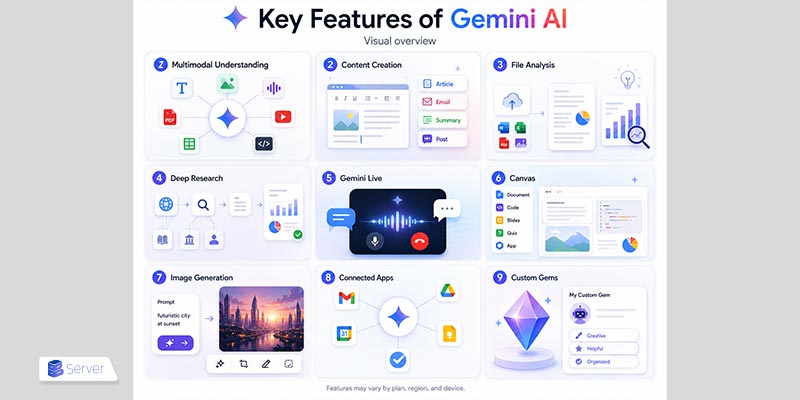
Google Gemini AI includes features for writing, research, learning, planning, creative work, and software development.
- Multimodal understanding: Gemini can process content such as text, images, audio, video, PDFs, spreadsheets, and code.
- Content creation: It can generate articles, emails, summaries, outlines, reports, social media posts, and other written materials.
- File analysis: Users can upload supported documents, spreadsheets, notebooks, photographs, and videos to receive summaries and insights.
- Deep Research: Gemini can prepare a research plan, examine multiple sources, and produce a detailed report about a complex subject.
- Gemini Live: Users can communicate with Gemini through natural voice conversations and ask follow-up questions without starting a new chat.
- Canvas: Canvas provides a workspace for creating and editing documents, code, applications, slides, quizzes, and other structured content.
- Image generation and editing: Gemini can generate original images from written prompts and make supported changes to existing images.
- Connected Apps: With the user’s permission, Gemini can work with supported services such as Gmail, Google Drive, Calendar, Keep, and Tasks.
- Custom Gems: Users can create customized versions of Gemini with specific instructions for repeated tasks or workflows.
The availability of these features may vary by country, language, device, account, subscription, and current usage limits.
Gemini AI Models and Versions Explained
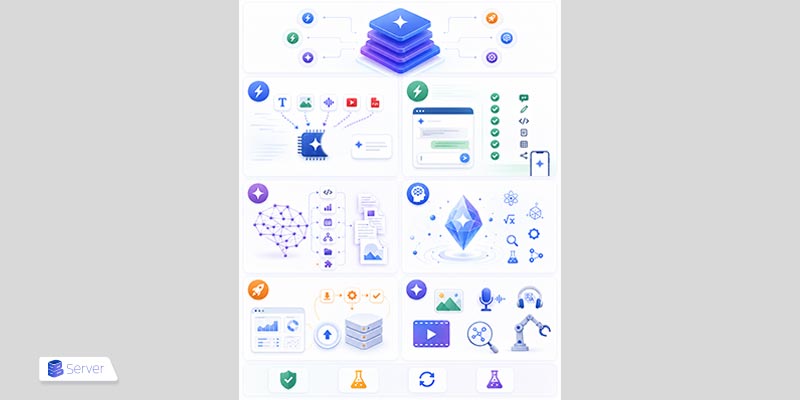
Gemini is a family of AI models rather than a single system. Each model provides a different balance of intelligence, response speed, reasoning ability, cost, and task complexity.
Google updates this model family regularly. As of July 2026, users and developers may encounter the following major models.
Gemini 3.6 Flash
Gemini 3.6 Flash is a fast and efficient model designed for real-world tasks, code generation, agentic workflows, and multimodal analysis.
It can process text, images, audio, video, and PDF files while producing text output. Google positions it as a more efficient successor to Gemini 3.5 Flash, with improvements in coding, knowledge work, tool use, and multi-step execution.
At launch, Gemini 3.6 Flash was made available mainly through the Gemini API, Google AI Studio, Android Studio, and selected enterprise products.
Gemini 3.5 Flash
Gemini 3.5 Flash is a general-purpose model that combines advanced capabilities with relatively fast responses.
It is suitable for:
- Everyday questions
- Writing and content creation
- Coding assistance
- Document analysis
- Multimodal tasks
- Multi-step workflows
Gemini 3.5 Flash remains available in the consumer Gemini app, including through its free offering, although usage limits apply.
Gemini 3.1 Pro
Gemini 3.1 Pro is designed for more complex tasks that require deeper reasoning, planning, coding, or creative problem-solving.
It is particularly useful for:
- Complex software-development tasks
- Detailed technical analysis
- Advanced planning
- Multi-step agent workflows
- Large documents and codebases
- Difficult reasoning problems
Access to Gemini 3.1 Pro may depend on the user’s plan and current usage limits.
Gemini 3.1 Deep Think
Gemini 3.1 Deep Think is a specialized reasoning mode built on Gemini 3.1 Pro.
It is intended for demanding problems in areas such as:
- Science
- Mathematics
- Engineering
- Research
- Experimental analysis
- Complex system design
Deep Think uses additional reasoning resources to evaluate difficult problems more thoroughly. Access may be restricted to selected subscription plans, accounts, languages, or regions.
Gemini 3.5 Flash-Lite
Gemini 3.5 Flash-Lite is designed primarily for developers who need fast, cost-efficient processing at a large scale.
Common applications include:
- Data extraction
- Request classification
- Document processing
- High-volume automation
- Agentic search
- Lightweight multimodal tasks
It is most relevant to developers and businesses using the Gemini API rather than general users of the Gemini app.
Specialized Gemini Models
Google also provides specialized Gemini models for particular types of work, including:
- Image generation and editing
- Real-time voice interaction
- Audio processing and translation
- Video generation and editing
- Semantic search and embeddings
- Robotics
For example, Google’s Nano Banana models focus on image generation and editing, while Gemini Omni Flash supports advanced multimodal and creative workflows.
Developers may also see model labels such as:
- Stable: A tested version intended for dependable production use
- Preview: An early release that may still change
- Latest: An alias that points to a recent version of a model
- Experimental: A test version that may be changed or removed
These labels mainly matter to developers using the Gemini API. General users usually only need to choose between a faster model for everyday tasks and a more advanced model for difficult reasoning.
How to Use Gemini AI: A Step-by-Step Guide
Getting started with Gemini AI is relatively simple. You can use it through a supported web browser or the Gemini mobile application.
1. Open Gemini
Visit the Gemini website or install the Gemini app on a supported Android or iOS device.
The mobile application may provide additional features such as voice interaction, camera input, and Gemini Live.
2. Sign In to Your Google Account
Select Sign in and enter your Google Account information.
Signing in allows you to save conversations, upload files, access available models, and use supported connected services.
Account eligibility may depend on age, location, organization settings, and account type.
3. Enter a Prompt
Type your question or instruction into the message box.
For example:
Create a simple seven-day English study plan for a beginner who can study for 30 minutes each day.
Clear prompts usually produce more useful responses. Include relevant details such as:
- Your goal
- The intended audience
- The preferred format
- The desired tone
- Any deadlines
- Important limitations
4. Add a File or Image
Use the file-upload option to attach supported content such as a document, spreadsheet, image, notebook, or video.
You can then ask Gemini to:
- Summarize the file
- Explain a specific section
- Extract important information
- Compare multiple documents
- Identify patterns
- Answer questions based on the content
Supported file formats, file sizes, and usage limits vary by account and subscription.
5. Review and Refine the Response
Read Gemini’s answer and use follow-up prompts to improve it.
For example, you can ask Gemini to:
- Make the response shorter
- Use simpler language
- Add practical examples
- Change the tone
- Present the answer as a table
- Expand a particular section
- Rewrite an unclear paragraph
You do not need to provide every instruction in a single message. Gemini can use earlier messages in the same conversation as context.
6. Verify Important Information
Gemini can produce inaccurate or outdated content. Verify important claims using trustworthy sources before relying on them.
This is particularly important for:
- Medical information
- Legal guidance
- Financial decisions
- Academic research
- Security instructions
- Software configurations
- Current prices, laws, and product details
Gemini should support research and decision-making rather than replace reliable sources or qualified professionals.
Benefits of Using Gemini AI
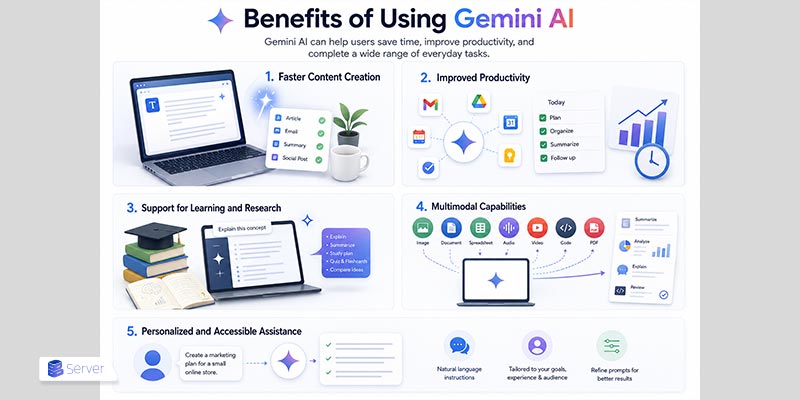
Gemini AI can help users save time, improve productivity, and complete a wide range of everyday tasks.
Faster Content Creation
Gemini can quickly generate drafts, articles, emails, summaries, outlines, reports, and social media content.
Users can also ask it to rewrite existing material, improve clarity, shorten long paragraphs, or adjust the tone for a particular audience. This can reduce the time required for brainstorming, drafting, and initial editing.
Improved Productivity
Gemini can assist with planning, organizing information, creating task lists, summarizing files, and simplifying repetitive activities.
Its Connected Apps functionality can also help eligible users find information in Gmail, work with documents from Google Drive, manage Calendar events, or interact with Google Keep and Tasks.
Developers and businesses can expand these capabilities by connecting AI services to workflow automation platforms such as n8n. These platforms can connect applications and APIs, react to webhooks, process data, and coordinate recurring AI-powered workflows.
Support for Learning and Research
Students and general learners can use Gemini to:
- Explain difficult concepts
- Summarize educational materials
- Create study plans
- Generate practice questions
- Produce quizzes and flashcards
- Compare ideas
- Explore unfamiliar subjects
Users can also request simpler explanations or continue asking follow-up questions until a topic becomes clearer.
Multimodal Capabilities
Gemini can process more than written text. Depending on the selected model and feature, users can provide images, documents, spreadsheets, audio, video, PDFs, or code.
For example, Gemini can summarize a report, analyze a spreadsheet, explain an image, review a code sample, or answer questions about an uploaded video.
Personalized and Accessible Assistance
Gemini accepts natural-language instructions, so users do not need programming knowledge to begin using it.
By adding context and refining their prompts, users can receive answers that better match their goals, preferred format, level of experience, and intended audience.
Limitations of Gemini AI
Although Gemini AI can be useful for writing, research, learning, and productivity, it is not always accurate or reliable.
Inaccurate or Misleading Answers
Gemini may generate incorrect, incomplete, or misleading information. These errors are commonly described as AI hallucinations.
A response can sound confident and well written even when the underlying information is incorrect. Important facts should therefore be checked using reliable and current sources.
Limited Understanding of Context
Gemini analyzes patterns in data rather than understanding the world in exactly the same way as a person.
It may misunderstand an unclear prompt, overlook an important detail, or generate an answer that does not fully match the user’s intention.
Providing clear instructions, relevant background information, and examples can reduce this problem.
Outdated Information
Gemini may not always provide the latest available information. Even when search or research tools are available, a response may rely on incomplete or unreliable sources.
Users should independently check time-sensitive information such as:
- Prices
- Laws and regulations
- Product specifications
- Software versions
- Subscription terms
- Recent news and events
Privacy and Data Concerns
Users should avoid entering highly sensitive or confidential information into Gemini.
Examples include:
- Passwords
- Banking information
- Private identification documents
- Confidential business files
- Unprotected customer data
- Private medical records
Users should review Gemini’s privacy, activity, and Connected Apps settings before uploading files or linking other services. Google provides controls for reviewing, deleting, and managing Gemini Apps activity.
Feature and Access Restrictions
Not every Gemini feature is available to every user. Access may depend on:
- Country or region
- Device and operating system
- Language
- Google Account type
- Age requirements
- Subscription plan
- Current usage limits
Some advanced models and features require a paid Google AI plan, while free users generally receive lower usage limits. Limits may also change based on capacity and the complexity of a request.
Dependence on Prompt Quality
The quality of Gemini’s response often depends on the quality of the prompt.
Short or vague instructions can produce generic answers. Users usually receive better results when they clearly define:
- The task
- The intended audience
- The desired format
- The required tone
- Relevant background information
- Important limitations
Lack of Human Judgment
Gemini cannot replace professional expertise, human creativity, critical thinking, or personal responsibility.
It may not fully understand ethical, emotional, cultural, legal, or professional considerations. For high-impact decisions, Gemini should be treated as a supporting tool rather than the final authority.
Using Gemini AI for Development and Automation
Gemini is not limited to conversations in the consumer app. Developers can use the Gemini API to add AI capabilities to websites, mobile applications, chatbots, internal tools, and automated business processes.
For example, a developer could build an application that:
- Summarizes uploaded documents
- Generates product descriptions
- Answers customer questions
- Classifies incoming messages
- Analyzes images
- Creates reports from structured data
- Reviews or generates software code
The application sends a request to the Gemini API, receives the generated response, and presents the result to the user.
Python is commonly used to build AI-powered APIs, automation scripts, and backend applications. Projects that must remain continuously available can be deployed on a Python VPS, which provides control over the Python version, installed libraries, background processes, and server configuration.
A scalable VPS hosting environment can also be useful for hosting an application’s backend, database, authentication system, scheduled tasks, and API integrations. The Gemini model itself continues to run on Google’s infrastructure; the VPS hosts the application that communicates with the Gemini API.
Developers should keep API credentials outside public source code, validate AI-generated output, monitor usage, and apply human approval before allowing an automated system to perform sensitive or irreversible actions.
Conclusion
Google Gemini AI is a versatile assistant that can support writing, learning, research, planning, coding, file analysis, and everyday productivity.
Its multimodal capabilities allow it to work with several forms of content, including text, images, documents, spreadsheets, audio, video, and code. Features such as Gemini Live, Deep Research, Canvas, image generation, and Google app integrations make it useful for both general and technical users.
However, Gemini is not always accurate. Users should verify important information, protect sensitive data, and apply human judgment before using its output in professional or high-stakes situations.
Overall, Gemini works best as an assistant that improves human productivity rather than replacing human knowledge and decision-making.
Readers who want to explore another major AI assistant can also read BuyServer’s complete guide to Claude AI.
Frequently Asked Questions About Gemini AI
Is Google Gemini AI Free?
Yes. Gemini has a free version, while paid plans provide higher limits and additional features.
Do I Need a Google Account to Use Gemini?
A Google Account is generally required to use Gemini’s main features and save conversations.
Can Gemini AI Generate Images?
Yes. Gemini can generate and edit images using supported image models.
Can I Use Gemini AI on My Phone?
Yes. Gemini is available on supported Android and iOS devices.
Can Gemini AI Help with Coding?
Yes. Gemini can generate, explain, review, and debug code.
Can Gemini Analyze Documents and Files?
Yes. Gemini can summarize and analyze supported documents, spreadsheets, images, videos, and notebooks.
Can Gemini Connect to Google Apps?
Yes. It can work with supported services such as Gmail, Drive, Calendar, Keep, and Tasks.
Is Gemini AI Always Accurate?
No. Gemini can make mistakes, so important information should be verified.
Is It Safe to Share Personal Information with Gemini?
Avoid sharing passwords, financial details, confidential files, or other sensitive information.